Live Translated Captions Now Available on CEO Zooms and Support Calls

To read this in Spanish, click here.
To read this in Chinese, click here.
The IT Team is pleased to announce that live translated captions will be available in Spanish, Chinese, English, and other languages. Going forward, this feature will be available for all CEO Zoom meetings and Support Calls, as long as you are using the Zoom app on your phone or computer.
With live translated captions, you can read what people are saying during a Zoom meeting in the language you select. Each participant can choose the language they prefer, and captions will appear at the bottom of their Zoom screen.
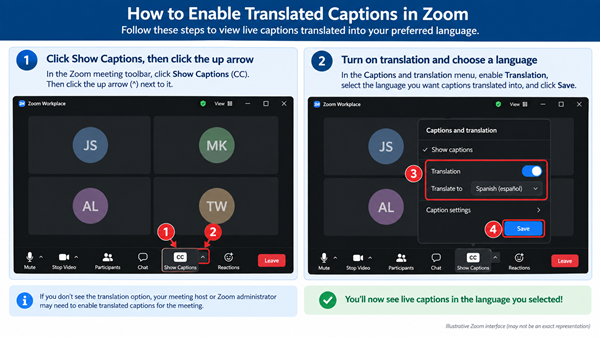
To view live Zoom captions, just follow these 4 easy steps during a Zoom meeting:
1. In the Zoom meeting controls toolbar, click “Show Captions.” If you do not see it, click “More,” then “Captions.”
2. Open caption options — Click the up arrow (^) next to Show Captions.
3. Turn on Translation — Under Captions and translation, click the button next to Translation to turn it on.
4. Choose your language — In the box beside “Translate to,” select the language you want to read, then click “Save.”