Important: Your PayPro Account is Getting an Upgrade on Friday, July 3rd. Here’s What You Need to Do to Access Your New Account!

Dear Team:
Beginning Friday, July 3rd, the way you access your PayPro employee self-service is changing. Here’s what you need to do to view your pay slips, access your personal information, view employment information, access your W-2 tax forms, and see your payroll deductions.
To get ready for this change, you will need to register your new account. Please be sure to register your new account by July 3rd or you will not be able to access any new pay checks after this date.
IMPORTANT NOTE: Your new account will have your payroll information dating back to January 2026. To access any information prior to 2026, you can still access your “You’ve Got Paid” account, but it will not be updated with any new information after July 3rd.
To register your new account, please click here. Or you can follow these 4 easy steps below.
Step 1: Download the app -or- access the site on your web browser.
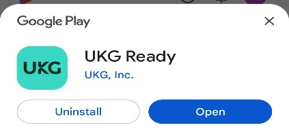
To download the app to your mobile phone, download UKG Ready / HCMTOGO from the Apple App Store or Google Play Store.
-or-
To access the new website from your web browser, go to https://secure.entertimeonline.com/ta/PPCN183.login.
Step 2: Log In Information.
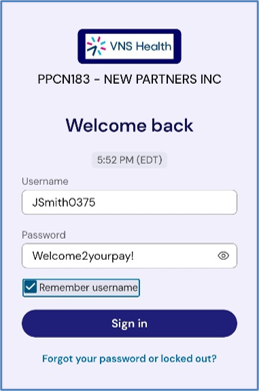
You will need to enter the following information.
- Region: select North America (excel Canada)
- Company Short Name: enter PPCN183
- Click Continue
- Enter Your Username: Your Username is:
First Initial + Last Name + Birth Month/Year (MMYY)- For Example: JSmith0375
- For Example: JSmith0375
- Enter the Temporary Password: Welcome2yourpay!
- Check the Remember username box
Step 3: Create a New Password
Use at least 10 characters and include a mix of uppercase letters, lowercase letters, numbers, and symbols.
- Example: Ilove-oreocookies2
Step 4: Verify Your Identity
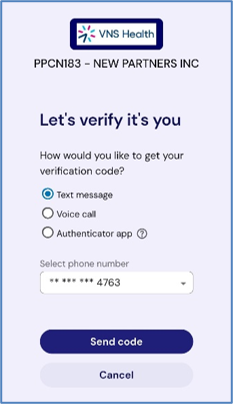
Select email or text message to receive a validation code and enter the code.
You have 15 days to log in and activate your account.
That’s it! Once you have activated your account, you’re ready to begin using it! To view your pay statements, select the following from the home screen:
- My Pay —> Pay History —> Pay Statements
If you have any questions or need help, please call 212-609-4442, and select option 2.
Thank you for your continued dedication to your clients and their families—and to VNS Health!
VNS Health Payroll Team